
The Xplorie widget, defined
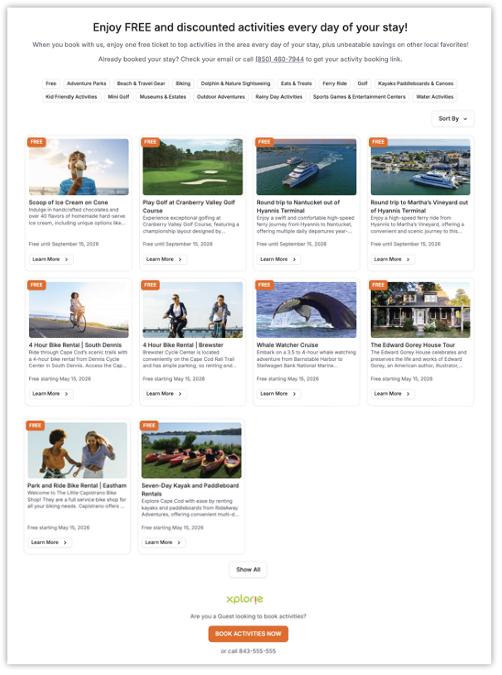
The Xplorie widget is an interactive activity catalog that can be embedded on your website. It’s a powerful tool for showcasing the value of your program to both travelers researching their vacations and booked guests planning their stay.
Through the widget, guests can explore activities, tours, attractions, experiences, and equipment rentals available during their stay – highlighting the value of booking with your brand while making trip planning simple and engaging.
Why should you use the widget?
The widget helps turn site visitors into booked guests by showing them the activities and experiences included with their stay right when they’re making decisions.
It works especially well on high-traffic pages and within property listings, where travelers are comparing options and looking for added value.
For the best results, we recommend embedding your widget throughout your site – especially on pages that get the most traffic and are most likely to drive bookings.
Wondering where you can (and should) put the Xplorie widget? Check out this article.
Are you missing out on important widget enhancements?
Our product team continuously enhances the widget with new features and improvements. These updates are automatically applied ONLY if your widget is our latest “dynamic” version. If you’ve not yet switched over, you won’t have access to the newest functionality, design improvements, or performance optimizations.
If you’re not sure whether your widget is up to date – or if you’d like to make changes or ask any questions – fill out this form or contact your Client Success Manager.
Current widget features
Your Xplorie widget is a core marketing tool for your program, designed to showcase your included activities, improve the guest experience, and drive more bookings directly from your website.
During onboarding, you’ll receive a customized widget that reflects the specific activities available through your program. Below is an overview of what the widget includes today and how it works.
Dynamic content
All content within the widget – including images, descriptions, and program availability – updates automatically based on your program. Any changes or product updates will reflect on your site in real time, with no additional work required.
Need to upgrade to the dynamic version of the Xplorie widget? Click here to get started.
Free activities first
The widget highlights the free activities available on your program by default, making it easy for guests to immediately see what’s included in their stay and understand the value of booking with your brand.
Guests can expand to the full activity catalog at any time to explore additional experiences.
Flexible sorting
Guests can sort activities in a way that works best for them, including:
- Alphabetical sorting (A–Z / Z–A)
- Prioritizing free activities
- Automatic prioritization of in-season activities for programs with multiple offerings
These options help guests quickly scan and compare experiences.
Category-based filtering
Filters at the top of the widget allow guests to narrow results by type of experience, making it easier to focus on what they’re most interested in.
Detailed activity views
The “Learn More” experience allows guests to explore additional activity details without leaving your site. For each activity, the Learn More sidebar includes descriptions, highlights, helpful tips, and location maps. This keeps guests engaged longer and encourages deeper interaction with your content.
As guests interact with activities, you gain insight into what captures their attention – providing useful data on guest interests and behavior to help inform your strategy.
Clear availability messaging
The widget clearly communicates when activities are available as complimentary offers. For example: “Free until April 30, 2026” or "Free starting May 1, 2026." This helps set accurate expectations and reduces confusion around timing and availability.
Flexible placement
The widget is designed without a fixed header or footer, allowing you to place it anywhere within your site. It is fully responsive and adapts to different screen sizes and layouts.
Clean, responsive design
Our product team continues to improve widget design to enhance user experience. Larger imagery, clear availability messaging, and display options – such as light, dark, or system mode – are recent additions.
Brand customization
You can align the widget with your brand by customizing fonts, colors, and messaging - including removal of the Xplorie-branded footer. You can also use Xplorie’s default headings and descriptions for a hassle-free approach. To learn more about available customizations, click here.
How can you request Xplorie Widget updates / features? Check out this article.
Troubleshooting
If you experience any issues deploying the widget, refer to the articles below or contact your Client Success Manager.
How to Embed the Xplorie Widget