
We recommend incorporating Xplorie activities, compliantly and effectively, in three distinct ways on Airbnb:
- Your Host profile
- Your property listings (including image carousels)
- Your guest communication flows
This article focuses on the first recommendation – adding activities to your Host profile. Be sure to review the companion articles covering listings and guest messaging for a complete, consistent approach.
Why Add Xplorie to Your Host Profile?
Your brand is more than the properties you manage – it reflects the care you give to each guest’s experience as a whole. As travelers increasingly prioritize experiences alongside accommodations, your Host profile offers a place to communicate that perspective. Highlighting Xplorie helps connect activities directly to your brand, signaling that you understand what travelers want – and intentionally provide added value as part of your stays.
Our Recommended Copy
Add this copy at the end of your existing Host description:
“As part of our commitment to enhancing experiences and value, we offer our guests complimentary local activities. Offerings vary by season/availability.”
TIP: How does your brand talk about Xplorie experiences?
It’s important to speak in a voice that feels like your brand and to use language your guests naturally understand. For example, you might use:
- Free activities
- Complimentary activities
- Included activities
How to Add the Recommended Copy to Your Host Profile
- Sign into your Airbnb account.
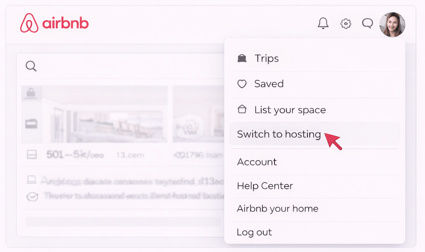
- Open the Airbnb menu and select Switch to hosting.
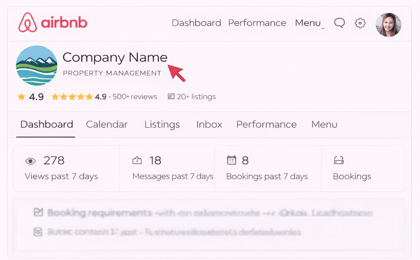
- Open your Host profile.
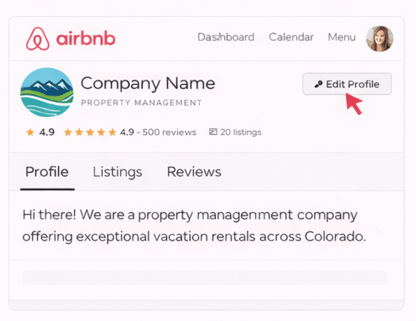
- Choose Edit profile.
- Scroll to the About section and paste the recommended text.
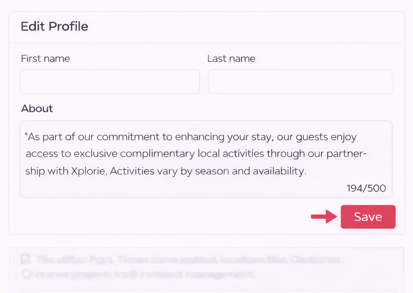
- Save and exit.
Troubleshooting
- If you don’t see the same menu labels, confirm you’re logged into the correct owner or property manager account.
- Some fields may be labeled Bio, About the host, or Property Manager Description depending on your account type.
- If your Vrbo account is connected to a property management system (PMS), certain profile fields may be managed within that system instead of directly in Vrbo.
Do you also host on Vrbo?
Be sure to review our Vrbo-specific articles to apply Xplorie consistently across platforms.